
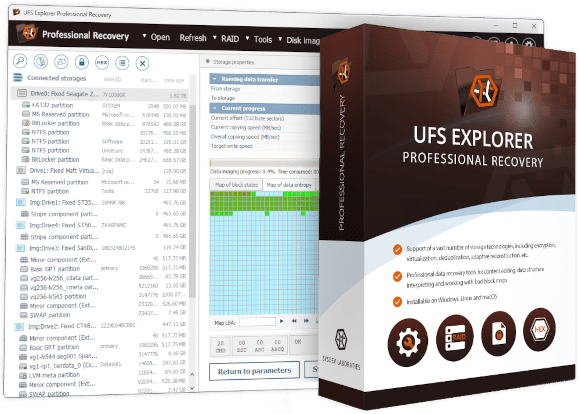


UFS Explorer Professional Recovery
- Specialist-oriented interface with fine-grained control throughout the recovery process
- Comprehensive support for LUKS/LUKS2, FileVault 2, VeraCrypt, eCryptFS, BitLocker and WD hardware bridge chip decryption
- Covers file systems ranging from common Windows, macOS and Linux formats to VMware VMFS, Novell NSS/NWFS and forensic images
- Built-in hex editor with a parity calculator, XOR, reverse address translation and storage comparison tools
- Sector size mutation for SAS and SCSI drives using non-standard sector sizes, such as 520, 524 and 528 bytes
- One license applies to Windows, macOS and Linux; perpetual use with a limited update period
- Free trial offers full scanning, decryption and imaging; file saving is limited to 768 KB per file
Expert-level toolkit for data recovery and digital forensics professionals


A specialist workbench for the most demanding data recovery tasks
UFS Explorer Professional Recovery is an expert-level data recovery workbench designed for data recovery engineers and digital investigators. The software provides precise control at every stage of the process, from initial disk imaging through low-level data analysis to final data recovery. It supports storage configurations, encryption methods, file systems and workflows that go beyond the scope of general-purpose recovery tools. Its interface is adapted for specialists, exposing a wide set of parameters required in professional work, which would be overwhelming in a consumer-oriented product.
The software covers all stages of a professional recovery workflow: write-protected imaging with hardware write-blocker support, multi-mode scanning, RAID assembly and reconstruction, decryption of a wide range of encryption technologies, low-level hex analysis with an integrated editor and batch or automated data extraction with detailed reporting. Each stage provides a level of control and configuration not available in general-purpose tools.
In terms of capabilities, the software covers several specialist areas in depth: encryption technologies such as LUKS, FileVault 2, VeraCrypt, eCryptFS and hardware bridge chip decryption; file systems including NTFS/ReFS with enabled data deduplication, VMFS/VMFS6, F2FS, Novell NSS/NWFS and legacy formats; forensic disk image formats such as E01 and AFF4; a full hexadecimal editor and analysis suite; and an advanced imaging toolkit with features like on-demand imaging and entropy maps.
Key features
Comprehensive encryption support
UFS Explorer Professional Recovery covers the widest range of encryption technologies across all UFS Explorer editions. Software encryption is handled transparently for most formats, including LUKS and LUKS2 (Linux full-disk encryption), Apple FileVault 2 and Apple APFS encryption, BitLocker and BitLocker To Go, TrueCrypt and VeraCrypt, OpenBSD BIO and eCryptFS file-level encryption, including encrypted NAS shares from Synology, QNAP, Asustor and TerraMaster.
Hardware-based encryption via WD bridge chips is also supported, including JMicron JMS561 (used in WD MyBook and MyCloud), Symwave SW6316, Initio 1607E, JMicron JMS538 and Oxford OXUF943SE. Encrypted virtual disks and disk images can be decrypted as well, including encrypted VMDK files, macOS encrypted DMG images and sparsebundle archives.
Decryption is performed entirely within the software, without running the operating system to unlock the volume. The password or key is entered directly, and the software decrypts it on the fly for all subsequent operations.
Extensive file system coverage
UFS Explorer Professional Recovery supports all major file systems across Windows, macOS, Linux, BSD and Solaris, along with specialized formats used in professional and forensic recovery workflows:
- VMFS and VMFS6 – VMware ESX/ESXi datastores, enabling recovery from nested VMs without extracting virtual disks first
- F2FS – Flash-Friendly File System used in modern Linux-based flash storage devices
- Novell: NWFS, NSS, NSS64 – NetWare file systems and Novell Storage Services
- Legacy: HPFS, HFS – older IBM/Microsoft and Apple file systems
Forensic image formats and advanced imaging
UFS Explorer Professional Recovery reads and works with forensic disk image formats commonly used in digital investigations, including EnCase E01/Ex01 (non-encrypted) and AFF4. These formats support embedded hash verification, chain-of-custody metadata and integrity checking, so the ability to process them makes the software suitable for workflows where image authenticity must be demonstrable.
The imaging functionality goes beyond what is typically available in classic editions. In addition to standard multi-pass imaging, it offers on-demand imaging (read-once access where data is written to a sparse image immediately on first read, helping avoid repeated access to unstable sectors), entropy map production alongside bad-sector maps; imaging based on file system maps (capturing only occupied space as identified by the file system, which reduces processing time on large sparse volumes) and MRT Data Explorer integration for workflows using MRT hardware tools, including bitmap-based imaging control.
Hexadecimal editor and analysis suite
UFS Explorer Professional Recovery includes a full hexadecimal editor, not merely a viewer, enabling direct modification of disk and partition content. The accompanying data analysis suite enhances standard hex viewing with versatile additional capabilities:
- Data interpreter – interprets raw bytes as multiple data types simultaneously
- Field highlighting – color-codes known file system and RAID structures directly in the hex view
- Parity calculator – computes RAID parity for selected regions
- XOR function – performs bitwise XOR between regions for manual RAID reconstruction
- Storage content comparison – compares two storage regions byte-by-byte
- Reverse address translation – traces a physical disk address back to the file or fragment it belongs to
- File fragment allocation tracing – maps file fragments across physical storage addresses
- Parallel search – searches multiple storages or regions simultaneously
RAID and advanced storage technologies
UFS Explorer Professional Recovery includes a complete RAID toolkit: automatic detection of RAID metadata from both hardware and software sources, a RAID Builder for manual reconstruction when metadata is unavailable, and adaptive reconstruction using bad-sector maps created from member drives. The Reverse RAID decomposition tool can break an assembled virtual array into its individual components for independent analysis, which is useful when verifying RAID parameters, migrating configurations or building a RAID set from a single remaining disk.
Automatic metadata recognition covers a wide range of storage systems, including hardware RAID controllers such as DDF1 (LSI, Dell and Intel), DDF2 (Adaptec), Silicon Image, JMicron and Intel Matrix. It also supports software implementations such as Linux mdadm, LVM and LVM2, Windows NT LDM and Storage Spaces, Apple Software RAID, Core Storage, APFS-based Fusion Drive and OpenBSD BIO. Proprietary configurations including Drobo BeyondRAID, Synology Hybrid RAID and RAID-F1, Btrfs-RAID and ZFS RAID-Z are also recognized. iSCSI target and initiator functionality allows assembled volumes to be shared as virtual SCSI disks with other machines.
Technical specifications
License model: key differences from the Classic product family
Host OS & system requirements
Encryption support
- LUKS/LUKS2
- Apple FileVault 2
- Apple APFS encryption
- BitLocker/BitLocker To Go
- VeraCrypt/TrueCrypt
- OpenBSD BIO
- eCryptFS (file-level encryption)
- Encrypted VMDK (VMware)
- Encrypted DMG and sparsebundle (macOS)
- JMS561, Symwave SW6316, Initio 1607E, JMS538, Oxford OXUF943SE (WD bridge chips)
Supported file systems
Disk images & virtual disks
RAID and storage technology support
- DDF2 (Adaptec) metadata support
- LVM2 support
- Legacy Apple Core Storage support
- Synology RAID-F1 support
- Reverse RAID decomposition tool
→ Includes all RAID levels and metadata types supported by UFS Explorer RAID Recovery
Detailed product information
Who is UFS Explorer Professional Recovery intended for?
UFS Explorer Professional Recovery is designed for two primary audiences: professional data recovery technicians operating in recovery labs or service centers, and digital forensics investigators who need to access or recover data from encrypted, damaged or complex storage in a forensically sound and legally defensible manner. Both require precise control over the recovery process, comprehensive support for storage technologies and the ability to handle scenarios not covered by general-purpose tools.
At the same time, it is not the optimal choice for simple recovery tasks such as restoring deleted files from an external drive or recovering data from a basic NAS failure. Those scenarios are better suited to UFS Explorer Standard Recovery or UFS Explorer RAID Recovery. The Professional edition becomes most relevant when the case involves encrypted Linux volumes, VMware datastores, WD hardware-encrypted drives, forensic image acquisition in E01 format, SAN environments, non-standard sector drives or manual low-level analysis using parity calculation and reverse address translation.
Licensing model explained
UFS Explorer Professional Recovery is licensed under a perpetual model, meaning that the license doesn’t expire and the software can be used indefinitely. Each license includes a defined update period during which new versions are available at no additional cost. After this period ends, the software continues to function normally on the last version released within the period, while updates to newer versions require a paid renewal.
A single license covers all three supported operating systems – Windows, macOS and Linux. Unlike in the Classic family, where licenses are issued per operating system, this approach allows professionals working across multiple platforms to use the software without purchasing separate licenses.
License enforcement is based on Thales Sentinel, an industry-standard protection solution used in professional software environments. Depending on the license type, it may be implemented via a Sentinel HASP USB hardware dongle or a software-based key. This provides stronger license protection than in the Classic family and ensures that the license is bound to a validated system, preventing unrestricted copying or transfer outside of proper license management procedures.
What UFS Explorer Professional Recovery can handle: capability summary
UFS Explorer Professional Recovery is a self-contained toolkit. The following overview highlights the most prominent functions introduced in this edition, relevant when evaluating the product for specialized data recovery or digital investigation work:
- LUKS/LUKS2 – Linux full-disk encryption used on encrypted servers, workstations and NAS systems
- VeraCrypt and TrueCrypt – open-source full-disk and container encryption formats
- eCryptFS – file-level encryption used in Linux and NAS environments (Synology, QNAP, Asustor)
- WD hardware bridge chip encryption – JMS561 and other chips used in WD MyBook, MyCloud and MyPassport devices
- VMFS / VMFS6 – VMware ESX/ESXi datastore file systems; for direct access to virtual machines inside the datastore without first extracting virtual disk files
- F2FS – Flash-Friendly File System in modern Linux-based flash storage
- Microsoft Data Deduplication – Windows Server storage optimization technology for NTFS and ReFS volumes
- Apple Core Storage – Apple's legacy logical volume management technology used to create Fusion Drives and support the FileVault 2 encryption (distinct from APFS-based systems covered by the Classic family)
- Novell NWFS, NSS, NSS64 and legacy HPFS, HFS – for read access to older or legacy storage environments
- EnCase E01/Ex01 and AFF4 – forensic disk image formats with embedded hash verification, chain-of-custody metadata and integrity checking
- Non-standard sector sizes – SAS/SCSI drives using non-standard 520/524/528-byte sector formats commonly found in enterprise systems
- Hexadecimal editor – full editing capability with a data interpreter, parity calculator, XOR operations, reverse address translation
- On-demand/read-once imaging – data is written to a sparse image on first read, avoiding repeated access to degraded sectors
- Entropy map generation – produced alongside bad-sector maps during imaging
- MRT Data Explorer integration – load task files and defect maps, control MRT hardware imaging tools, including bitmap-based imaging of specific ranges and file selections
- Interactive HTML reports with file hash verification and integrity checking – suitable for documentation and verification of results in professional and forensic workflows
- Reverse RAID decomposition – breaks assembled arrays into individual components for inspection
UFS Explorer Professional Recovery vs UFS Explorer Technician
Within the Professional product family, UFS Explorer Professional Recovery and UFS Explorer Technician share the same core engine. However, the Technician edition extends it with capabilities aimed at hardware-intensive specialist scenarios: SCSI/ATA raw command interfaces, automated SAN plugin support (Dell EqualLogic, HPE MSA, HPE 3PAR, IBM DS3, NetApp E-series) for immediate access to virtual volumes, support for additional specialized file systems such as QZFS (QNAP QuTS hero), WAFL (NetApp ONTAP), AIX JFS1/JFS2 and VxFS, as well as QNAP Qtier automated tiering and secure data sanitization. It also uses a time-limited licensing model rather than a perpetual one, which contributes to its lower entry price.
For most professional data recovery workflows, including complex RAID cases, encrypted volumes, forensic imaging, deep hex analysis and a wide range of storage technologies, UFS Explorer Professional Recovery provides all the necessary tools. The Technician edition becomes indispensable specifically when automated SAN plugin access, low-level hardware control or support for additional specialized file systems is required.
Frequently asked questions
How is UFS Explorer Professional Recovery different from the Classic product family?
Is UFS Explorer Professional Recovery suitable for users without a data recovery background?
How does the licensing differ from the Classic family?
What is Thales Sentinel and how does it affect software usage?
Can UFS Explorer Professional Recovery decrypt LUKS, FileVault 2, VeraCrypt and eCryptFS?
What are the trial limitations?
Software releases
- Download links for all previous product versions starting from Version 7 and up to the current version, with the record of updates, are in the Changes log.
- Other discontinued versions (Version 3, Version 4.9.2 up to Version 5.9) are on the Legacy downloads page.